Quick start
Learn Solvella in 2 minutes
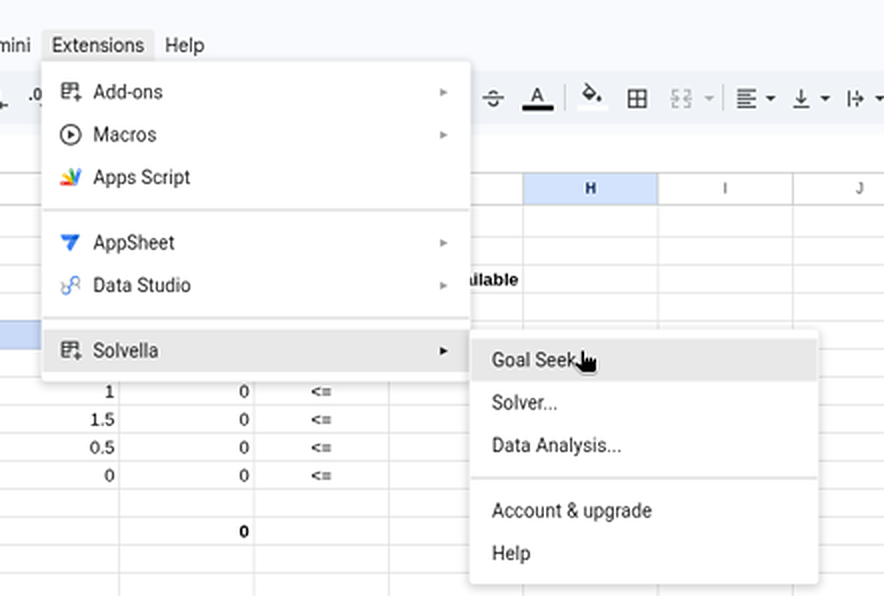
Solvella puts Excel's Goal Seek, Solver and Data Analysis tools into Google Sheets. Here's where to find them and which one to use.
Install Solvella (once)
Get it from the Google Workspace Marketplace, or inside any spreadsheet go to ExtensionsAdd-onsGet add-ons and search for Solvella.
Google asks you to allow access. Solvella can only see the spreadsheet you open it in.
Coming soon to Google Workspace MarketplacePick the right tool
Not sure which one you need? Start from what you want to do:
Hit a target numberWhat interest rate gives a $2,100 repayment? Goal Seek Find the best plan within limitsMost profit from limited hours and materials. Solver See what drives a numberHow much do ads and price change sales? Regression Summarise a column of numbersAverage, middle value, spread, min and max. Descriptive Statistics Compare groupsIs group A really different from B? t-Test, ANOVA I know Excel. Where's everything?Every Excel button and where it lives now. Switching from ExcelPractise on a sample sheet
Every guide comes with a ready-made sheet, so you can follow along click by click. To open one in Google Sheets:
- Download the file below.
- In Google Sheets, go to FileImportUpload and choose the file.
- Pick Insert new sheet(s) and press Import data. The formulas come with it.
Follow alongAll four practice sheets in one file: workshop plan, home loan, sales and test scores.
All guides
Each one takes about two minutes, with a picture for every step.
Goal SeekFind the interest rate that fits a $2,100 monthly budget.4 steps · Free
SolverPlan a workshop's output for the most profit, then read the reports.6 steps · Free
RegressionSee how ad spend and price drive sales, and what R Square and P-values mean.5 steps · Free
Descriptive StatisticsSummarise test scores for three groups in one go.3 steps · Free
Switching from ExcelWhere each Excel button lives in Solvella, and what's different.4 steps
TroubleshootingCan't find Solvella? No feasible solution? Turning on Pro.Quick answers