Solvella

Mini guide 5 steps · 2 min

Regression: see what drives your numbers

Regression measures how much each factor moves a result. Example: 24 months of sales. How many extra units does each $1k of advertising bring, and how many does a higher price cost you?

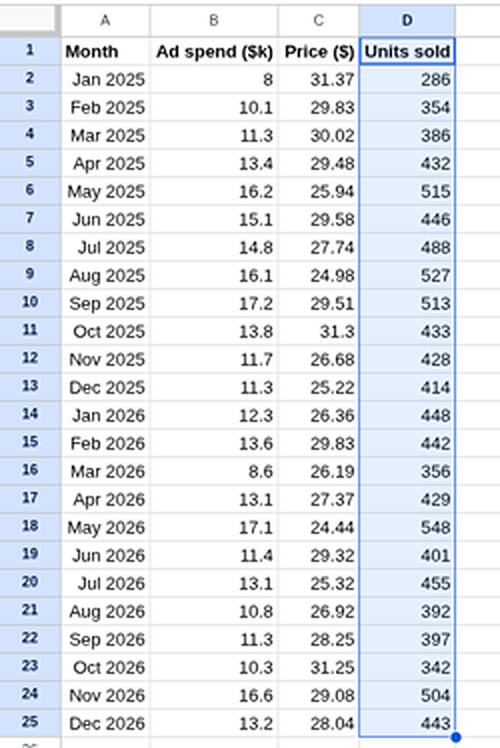
Follow alongThe two years of monthly sales used in this guide.
  1. Put your data in columns

    • 1 Units sold (column D) is the result you want to explain. Excel calls it Y.
    • 2 Ad spend and Price (B and C) are what might drive it, called X. They need to sit side by side.

    Headings go in row 1, one row per month, no gaps.

    Sales data: month, ad spend, price and units sold for 24 months
    Two years of monthly sales.Enlarge
  2. Open Data Analysis and pick Regression

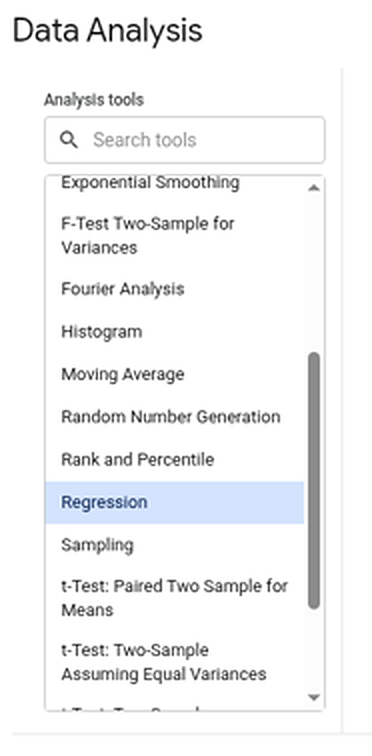
    Click ExtensionsSolvellaData Analysis.... Then 1 type reg in the search box, or scroll, and 2 click Regression.

    The Data Analysis dialog's tool list with Regression selected and a search box above it
    Pick Regression from the list.Enlarge
  3. Fill in the form and press Run

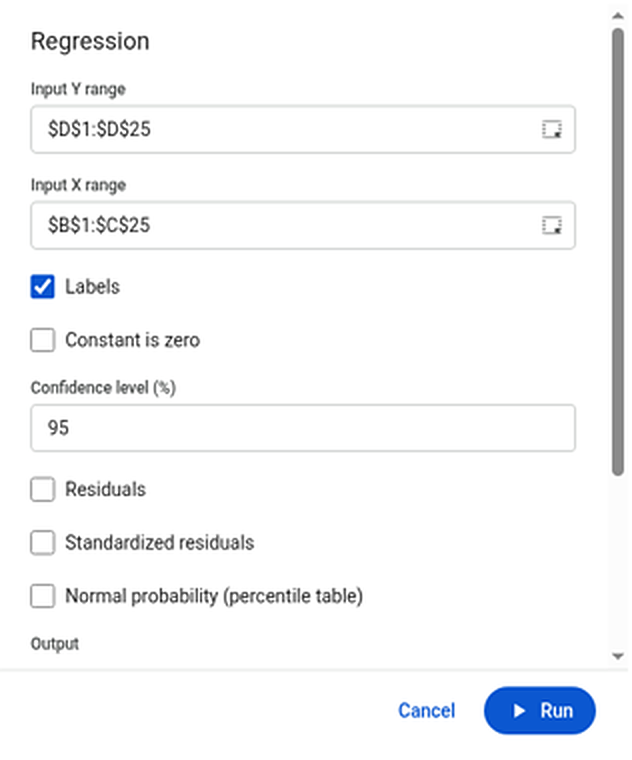
    • 1 Input Y range: D1:D25
    • 2 Input X range: B1:C25
    • 3 Tick Labels, because row 1 holds the headings.
    • 4 Press Run. The results go on a new tab called Regression.
    The Regression form: Input Y range $D$1:$D$25, Input X range $B$1:$C$25, Labels ticked, and the Run button
    The Regression form, filled in.Enlarge
  4. Check how well it fits: R Square

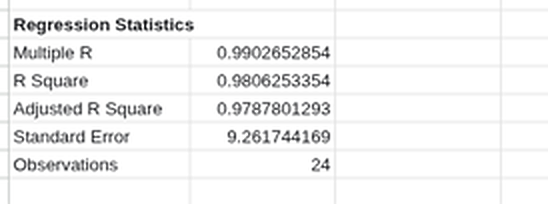
    1 R Square 0.98 means ad spend and price together explain 98% of the ups and downs in units sold. The closer to 1, the better the fit.

    Regression Statistics: Multiple R 0.990, R Square 0.981, Adjusted R Square 0.979, Standard Error 9.26, Observations 24
    Regression Statistics, at the top of the output.Enlarge
  5. Read the effects: Coefficients and P-values

    • 1 Coefficients: each extra $1k of ads adds about 21.7 units. Each $1 on the price loses about 8.3 units.
    • 2 P-value: the chance an effect this big is just luck. Below 0.05 means you can trust it. Here they're all tiny (3.87E-18 means 0.000…000387, with 17 zeros).

    The Intercept (386) is the starting point the line is built from; on its own it rarely means much.

    Regression coefficients: intercept 386.1, ad spend 21.65, price -8.32, with P-values
    The coefficients table, near the bottom.Enlarge
Want more output? Pro adds residuals, standardised residuals, the normal probability table and confidence levels other than 95%. All 19 tools: Data Analysis tools.